
Browse the Web Anonymously with Free Proxy
Overview
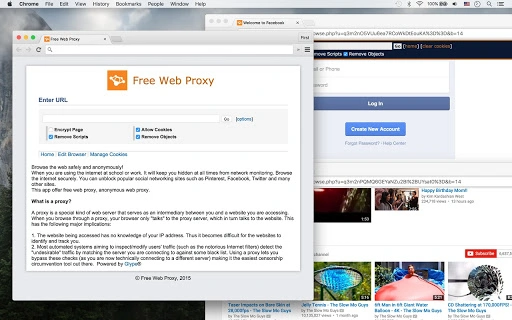
The software is designed to facilitate anonymous and secure web browsing, particularly in environments where internet access is monitored or restricted, such as schools and workplaces. By routing traffic through a proxy server, it helps users maintain privacy and bypass content filters. The primary purpose is to enable access to blocked websites, including popular social media platforms like Facebook, Twitter, and Pinterest, without revealing the user’s actual IP address. This makes it a useful tool for individuals seeking greater online freedom and privacy.
Target users include students, professionals, and general internet users who need to access restricted content while maintaining a degree of anonymity. The software operates as a desktop application, offering a straightforward interface for managing proxy connections. Real-world usage scenarios involve circumventing network-level restrictions, protecting personal data during public browsing, or simply avoiding tracking by third parties. While the developer’s background is not publicly detailed, the application is positioned as a privacy-focused utility with a minimal footprint and straightforward functionality.
Key Features & Capabilities
- Anonymous Web Browsing – Routes all internet traffic through a proxy server, masking the user’s real IP address and location.
- Free Web Proxy Access – Offers no-cost proxy services to connect to websites without requiring a paid subscription.
- Website Unblocking – Enables access to commonly restricted sites such as Facebook, Twitter, Pinterest, and other social networks.
- Simple Desktop Interface – Provides an intuitive, lightweight application for easy setup and use without technical expertise.
- Secure Web Connections – Promotes safer browsing by acting as an intermediary between the user and target websites.
These features allow users to maintain privacy while navigating the web, especially in high-monitoring environments. For example, a student can use the app to access educational resources blocked by school filters, while a remote worker may use it to access tools restricted by corporate firewalls. The proxy functionality ensures that network administrators cannot trace the user’s activity directly to their device, enhancing security and freedom of access.
User Interface, Workflow & Performance
The application features a clean and minimal desktop interface, optimized for ease of use. Navigation is straightforward, with essential functions such as connecting to a proxy, selecting a server, and managing connection status clearly labeled. The workflow is designed to be completed in a few clicks, making it accessible even to non-technical users. Users can initiate a proxy connection with minimal configuration, which supports rapid deployment in time-sensitive situations.
Performance details were not specified by the developer. However, based on its 15.2 MB file size and desktop application format, it is expected to have low system resource usage. The application does not appear to require high CPU or RAM allocation, suggesting stable operation on standard machines. Stability is assumed to be consistent with lightweight desktop utilities, though specific reports on crashes or lag were not provided. The developer did not specify resource usage details, so actual performance may vary depending on network conditions and proxy server availability.
Compatibility & System Requirements
The software is compatible with both Windows and Mac operating systems, supporting a broad range of users across different platforms. The application version is 1.0, indicating a stable initial release. Installation size is 15.2 MB, which is compact for a desktop application. The developer did not specify exact system requirements, including minimum CPU, RAM, or disk space. As such, compatibility with older or low-end hardware remains uncertain.
Platform compatibility information is limited to the supported operating systems. No details were provided about 64-bit vs 32-bit support or specific OS versions (e.g., Windows 10, macOS Ventura). The developer did not provide additional system requirements, so users should exercise caution when installing on older or less common systems. Overall, the software appears to be designed for general desktop use with minimal overhead.
Pros and Cons
Pros
- Free to use with no subscription required
- Simple, intuitive interface suitable for beginners
- Supports both Windows and Mac platforms
- Enables access to blocked websites and social media
- Offers anonymous browsing by masking IP address
Cons
- No information on system requirements or hardware compatibility
- Performance and speed depend on proxy server availability
- Privacy claims not independently verified
- No mention of encryption or secure tunneling protocols
- Limited transparency about proxy server sources and management
FAQ Section
Is the software compatible with Windows and Mac?
Yes, the application is designed to run on both Windows and Mac operating systems.
Is the software safe to use?
The software functions as a proxy tool, but the developer did not provide details on encryption, data handling, or security protocols. Users should exercise caution when entering sensitive information.
Does the software require a subscription?
No, the software is free to use and does not require a paid subscription.
Can I use it offline?
The application requires an active internet connection to function, as it relies on proxy servers to route traffic.
How often are updates released?
Update frequency was not specified. Users should check the official source for the latest version.
Final Thoughts + CTA
This desktop application delivers a straightforward solution for users seeking anonymous and unrestricted web access. Its core functionality—bypassing network restrictions and enabling private browsing—remains effective for basic use cases. While the lack of detailed system requirements and security disclosures is notable, the software’s lightweight design and cross-platform availability make it accessible to a wide audience. It is particularly beneficial for students and professionals who need to access blocked content without technical overhead.
For those prioritizing privacy and simplicity in a controlled network environment, this tool offers a practical option. However, users should remain cautious about the transparency of proxy sources and the level of protection offered. With its free model and minimal setup, it stands out as a convenient utility for basic proxy needs.
Download Browse the Web Anonymously with Free Proxy now.







